Withdrawing with 2FA Enabled
Written By _flush_f0x_
Last updated About 2 hours ago
If you have two-factor authentication (2FA) switched on, there is one extra step when you withdraw: after entering your withdrawal details, Flush.io asks for a 6-digit code from your authenticator app to confirm it is really you. It is a quick, important safeguard that makes sure only you can move funds out of your account.
Confirming your withdrawal
You start a withdrawal exactly as usual: open the Cashier, switch to the Withdraw tab, choose your coin, and enter the destination address and amount. Once you confirm those details, the verification step below appears.
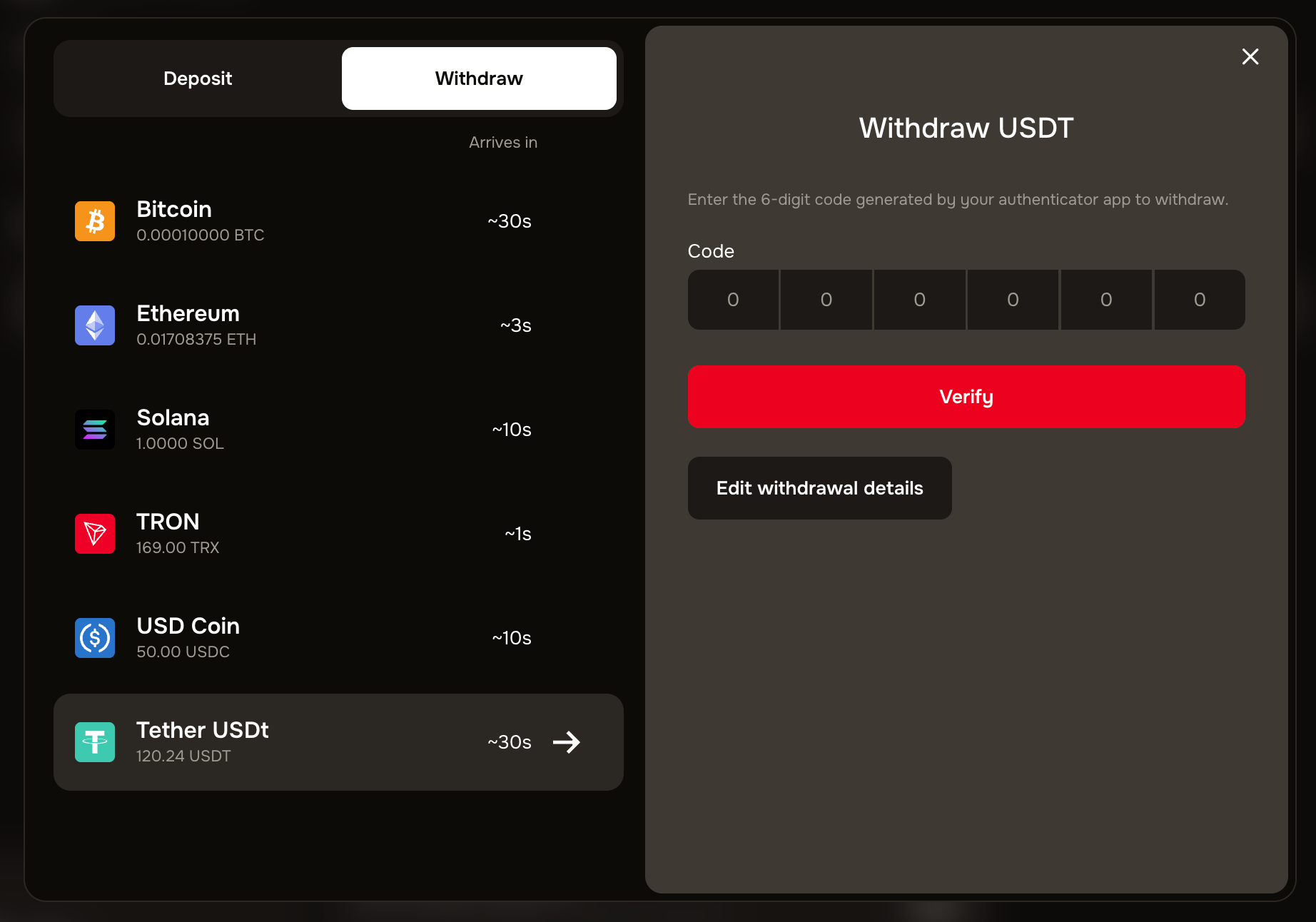
Figure 1: the 2FA verification step shown after you enter your withdrawal details
1. Open your authenticator app and find the current 6-digit code for Flush.io.
2. Type the 6-digit code into the Code boxes.
3. Select Verify. Once the code is accepted, your withdrawal is submitted for processing.
4. Need to change something first? Select Edit withdrawal details to go back and adjust the address or amount before confirming.
The code changes, so use the current one
Authenticator codes refresh every few seconds, so always enter the one showing right now. If it is rejected, it may simply have expired; glance at your app for the fresh code and try again.
If you can’t get a code
If you have 2FA on but cannot produce a code, for example you have lost the phone with your authenticator, you will not be able to pass this step.
Use your backup codes. If you saved backup or recovery codes when you set up 2FA, you can use one to get back in and continue.
No backup codes? Contact our support team through the official site, and they will help you recover access to your account securely.
Never share your code with anyone
Your 2FA code is for you alone. Flush.io will never ask you to send it, and no genuine person will either. Only ever enter it into this verification step on the official site. The same goes for your withdrawal address: double-check it is correct before you confirm, because a confirmed crypto withdrawal cannot be reversed.
Good to know
It applies to every withdrawal. With 2FA on, this confirmation step appears each time you withdraw, keeping your funds protected even if someone else knew your password.
Only your withdrawals are gated. This extra check is specifically about moving funds out, which is exactly where the strongest protection matters most.
Edit before you verify. If you spot a wrong address or amount, use Edit withdrawal details rather than verifying; nothing is submitted until you select Verify.
Not using 2FA yet? Turning it on adds this safeguard to your withdrawals. Our guides on what 2FA is and enabling 2FA walk you through it.
Was this helpful?
Still need help? Ask the team