Where Do I Find My Wallet Transaction History?
Reviewing your deposits and withdrawals
Written By _flush_f0x_
Last updated About 14 hours ago
Your Transactions page keeps a full record of your deposits and withdrawals, each with its status, so you can look back over your activity at any time.
Your Transactions page
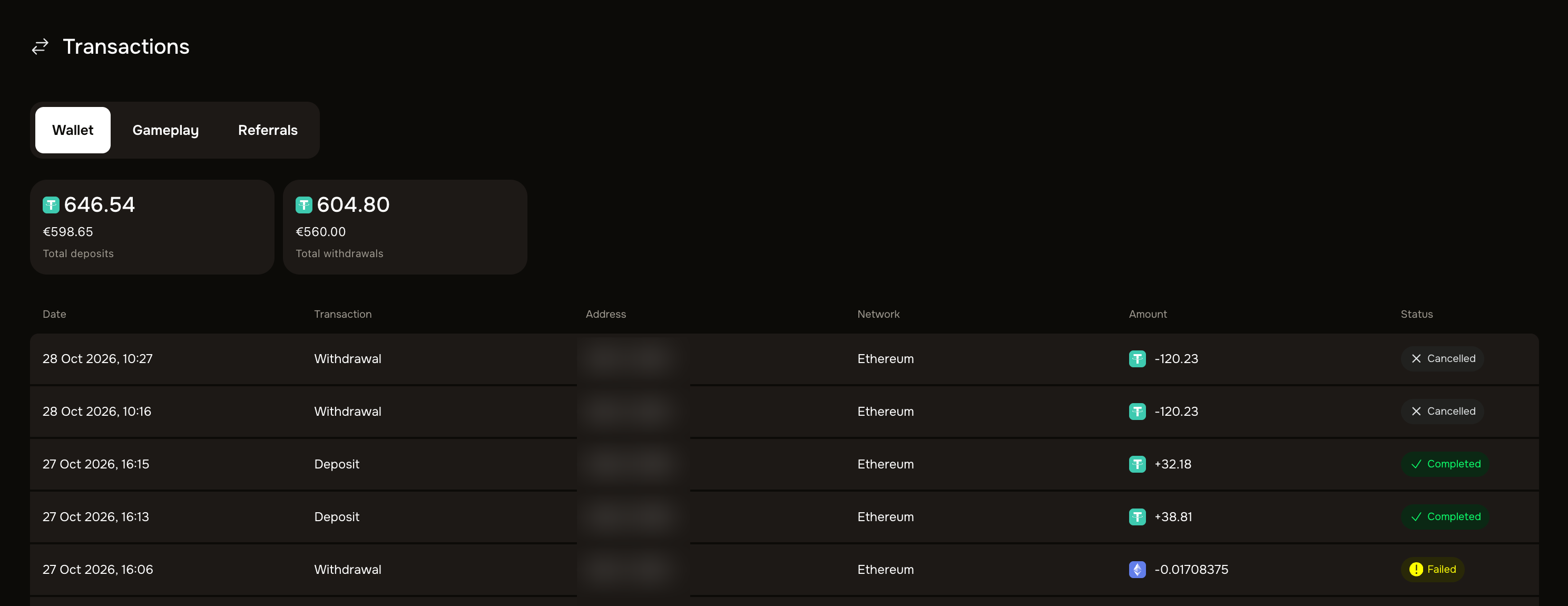
Each transaction at a glance. Every entry shows the date, whether it was a Deposit or Withdrawal, the address, the network, the amount, and its status: Completed, Pending, Cancelled or Failed.
Your totals. The page also shows your total deposits and total withdrawals at the top.
Tabs for different activity. Switch between Wallet (your deposits and withdrawals), Gameplay, and Referrals using the tabs.
Cancel a pending withdrawal here. A withdrawal that is still Pending shows a Cancel button on this page; our guide on cancelling a withdrawal covers it.
Other ways to check
Your balance. Your current balance, in the header and per coin in the balance menu, reflects your deposits, play and withdrawals.
Your own wallet or the blockchain. Every deposit and withdrawal is a crypto transaction, so your own wallet or exchange, and the public blockchain, also hold a permanent record of each one.
Need a full account statement?
If you need a complete record beyond what the Transactions page shows, contact our support team through the official site and they can help.
Good to know
Status at a glance. The Transactions page is the quickest way to confirm whether a specific deposit or withdrawal has gone through.
Keep your own records too. Noting the date, amount and coin of larger transactions makes any future query quick to resolve.
Was this helpful?
Still need help? Ask the team