Where Can I See My Payment Transactions?
Your deposits and withdrawals, all in one place
Written By _flush_f0x_
Last updated About 13 hours ago
All of your payment activity lives on your Transactions page: every deposit and withdrawal, with its status. You can reach it from your account dropdown, or go straight to prod.flush.io/transactions.
Opening your Transactions page
1. Select your account dropdown in the top right.
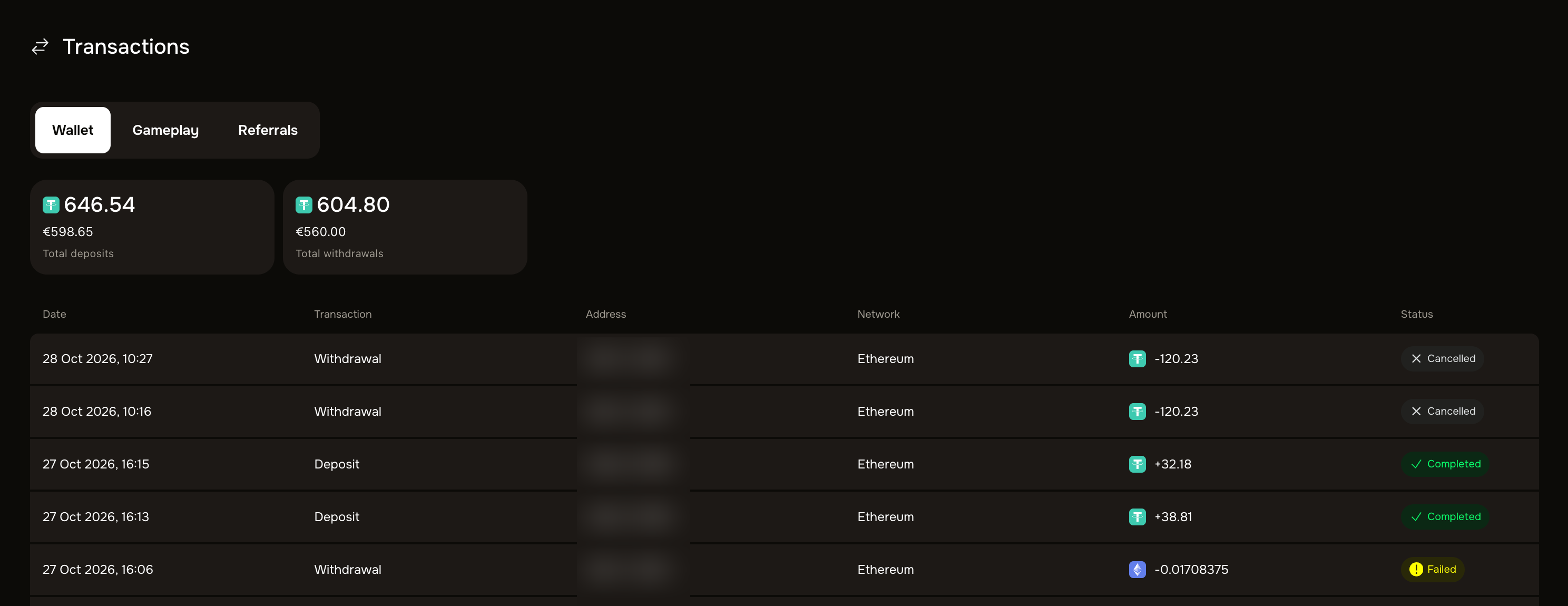
What you will see
Each transaction. Every entry shows the date, whether it was a Deposit or Withdrawal, the address, the network, the amount, and its status.
Your totals. Your total deposits and total withdrawals are shown at the top.
Tabs for each type of activity. Switch between Wallet (your deposits and withdrawals), Gameplay, and Referrals using the tabs.
What each status means
Pending. The transaction is still being processed or confirmed.
Completed. It has gone through: a deposit has credited to your balance, or a withdrawal has been sent.
Cancelled. A pending withdrawal that was cancelled; the amount was returned to your balance.
Failed. The transaction did not complete. Any funds reserved for it are returned to your balance; contact our support team if you are unsure why.
Cancel a pending withdrawal here
If a withdrawal is still Pending, this page is also where you cancel it: a Cancel button appears next to it. Our guide on cancelling a withdrawal covers the steps.
Good to know
Status at a glance. The Transactions page is the quickest way to confirm whether a deposit or withdrawal has gone through.
Need a full statement? For a complete record beyond what the page shows, contact our support team through the official site.
Was this helpful?
Still need help? Ask the team